Showing posts with label #JRCideaLab. Show all posts

Monday, June 18, 2012

The Oakland Press launches News at Noon show


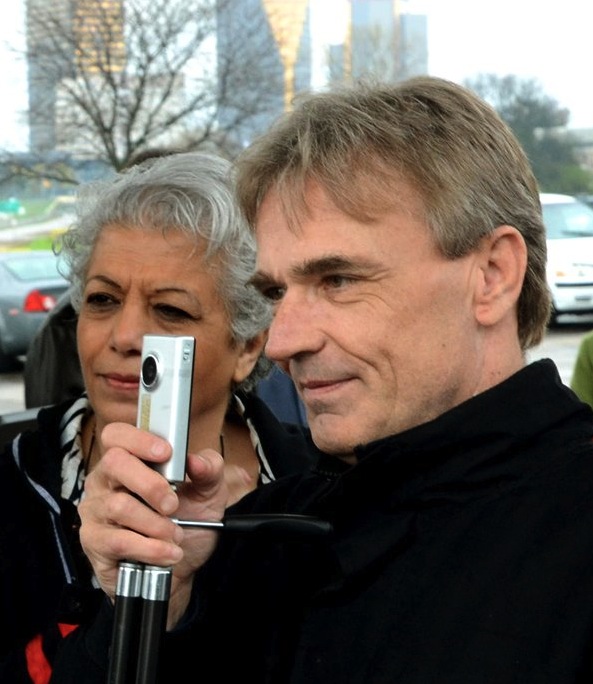
Aftab Borka films Chris Nelson anchoring "News at Noon"
We're not your grandfather's newspaper.
Operating on the belief that we can use a variety of platforms to deliver well-rounded story packages, The Oakland Press has placed a huge emphasis on making use of video and audio to help us tell stories. 
The amount of video and audio content we're creating made a newscast a perfect fit to showcase that work. The idea led us to launch the show "News at Noon."
"The show has great value because it promotes the videos that our staffers produce and gives our readers/viewers an opportunity to get all the top news of the day in a few minutes," said Aftab Borka, video program producer for The Oakland Press. 
Borka coordinates the newscast, which runs Mondays through Fridays, and regularly anchors it.
"We have been experimenting for months to come up with something that is competitive with Detroit newcasts by offering a more Oakland-centric flavor," said Executive Editor Glenn Gilbert. "(It's) struck a chord with readers, moving into our daily top 20 for page views." 
Viewership of the news show has been growing since its launch on May 21. Recent shows have climbed into the top 10 spot for the month of June — not an easy feat for videos that aren't crime or breaking news related. 
"We think it is a hit and may offer a good platform for an advertising sponsor," Gilbert said. 
Beyond showcasing the videos produced by Oakland Press staffers, "News at Noon" also features regular commentary from locally well-known writers like sports columnist Pat Caputo and entertainment writer Gary Graff. Online Editor Stephen Frye does a video blog once weekly for the show and News Editor Matt Myftiu contributes his "Tech Time" reviews. 
"News at Noon" logo
Political reporter Charles Crumm is a regular contributor, providing both audio sound bites from politicians and commentary on political stories.
The show has also provided an opportunity for broadcast interns to both host and produce a professional show. Former Specs Howard School of Media Arts interns Chris Nelson and Brittany Wright have both anchored the show and are now helping on a freelance basis, as has Oakland University journalism student Emmy Lucas.
"It makes great use of videos we are already producing and is a snappy, six minute summary of the day's top stories put up on our site at a time when viewership is high and TV isn't offering anything," Gilbert said. 
Stay tuned — and yes, we get to say that now.

Our show on May 24 featured video from a tragic crash that injured a police officer

The June 12 show caught our audience up on a city commission meeting that was bombarded by people openly carrying guns

Tuesday, May 15, 2012

Golf map serves readers in print, online and on mobile devices

PDF of the print page
Just before golf season hit southeastern Michigan, Online Coordinator Paul Kampe had a cool idea to freshen up The Oakland Press' annual golf section with a new, interactive map.
The map that'd been used previously was built in a software our newsroom no longer uses by a staffer who left us years ago.
It was outdated and also, not nearly as useful as what Kampe devised using Google maps.
The old map was simply an image for print with golf course locations on it.
The new map? Golfers can get directions to and from courses, view traffic maps, check out weather conditions and sync it to their GPS, call the courses or go to a course website. And, they can do it all from their phone.
Seriously cool stuff.
"All together, it took about two hours or so to plot all the points," Kampe said. "I can't imagine how long it would've taken doing it the old-fashioned way."
Not only does it offer readers more, but it's also something that will continue to exist and be easily updated.
Kampe used a screengrab to run the map in print, giving Google appropriate credit and including notes on how to use the map's different features. He also published a QR code underneath the map, giving readers a way to go directly from the map on the print page to the map on their smartphones.
The QR code got 50 clicks on its first day (the map published in mid-April) and is up to 203 clicks now. Bit.ly statistics show it's gaining a minimum of about one click per day, though a few lulls in clicks were likely due to some chilly late April weather. Clicks also seem to spike on particularly nice weekend days.
Google shows that the map has had 3,827 views to date and got a five-star rating.
"I'd like one of these for the whole State," commented one person on the map.
View 2012 Oakland County Golf Courses in a larger map

Friday, April 20, 2012

Presenting Google Voice for journalism at APSE conference

Late last year, I gave a series of training workshops on using Google Voice for journalism.
The Oakland Press Sports Editor, Jeff Kuehn, is hosting this year's APSE conference here in our building and — seeing as how these projects have worked out very well with passionate sports fans — asked me to give the workshop at the conference on Monday, April 23.

Training resources
• How-to sheet on setting up a Google Voice account
• Presentation on Google Voice and audio editing
• How-to sheet on using Audacity for audio editing
• Case study on gathering Lions' fan reactions using Google Voice


Here's a compilation of completed projects that I'll use as examples.

Sports related projects

Case study from The Oakland Press on gathering fan reactions to Detroit Lions games
Lions fans: 'Take us to the Super Bowl'
Crowdsourcing method: Online, social media, print.
About 10 responses, 252 video views. 


Lions fans sound off on what went wrong against the San Francisco 49ers
Crowdsourcing method: Online, social media, print.
Eight responses, 497 video views.


Lions fans criticize Matthew Stafford, offensive line after loss to Falcons
Crowdsourcing method: SMS only.
Twenty responses, 166 video views.


Oakland Press Online Coordinator Paul Kampe's project on fan reaction to Suh's bad behavior
Soundoff: Suh's lack of transparency hurting fans
Crowdsourcing method: Not documented.
117 video views.


The Delaware County Daily Times' "Fire Andy Reid" project
Delco speaks: What should the Eagles do now?
Crowdsourcing method: Online only. 
Sixty responses in less than 10 minutes.


The Delaware County Daily Times' "Penn State Scandal" project
We asked: Should Joe Paterno step down right now?
Crowdsourcing method: Online only.
Twenty responses in less than an hour.


Non-sports related projects

The first project: Crowdsourcing "Where were you" memories from 9/11
Remembering 9/11: Voices of Oakland County 


Tom Caprood (Troy Record) gathers public reaction to a proposed McDonald's location
REACTION: Readers share their feelings on the proposed Troy McDonald's


Vince Sullivan (Delaware County Daily Times) gathers reaction to Catholic school closings
Hear what people are saying about Catholic school closings

Friday, March 30, 2012

'Front Page' photo contest a hit with readers

Screenshot of our new timeline page w/cover photo
The 'Front Page' photo contest we hosted this month was a hit with our audience — and I'm rather pleased with the way it all turned out.

About the photo contest
Tomorrow's Facebook deadline to switch to the timeline format prompted all of this. We needed a 'cover photo' and I was inspired by a colleague's work to crowdsource for submissions to fill that space.
We received almost 40 entries.
Considering there was no monetary prize associated with it — just the opportunity to be featured on the front page of our paper — that's a pretty good response.

The voting process
We set up an album on Facebook and uploaded the photos as our very first board on Pinterest.
On Facebook, we had a total of 581 votes — that's more engagement on any one topic than we've ever had before.
We also saw our number of likes for the page increase by 64 over a one-week period. Average growth for the page is usually somewhere around 30 new likes a week, so that was a good boost. Plus, in the first 24 hours after the album was posted, we saw likes to our page increase by about 30 — awesome, considering that's an average week's worth of growth.
The Pinterest board generated 34 repins and when the contest was done, we'd gained 15 followers to the account.
We still have a lot of work to do on Pinterest, but it's a good first step.

Promoting the voting
Votes began adding up as soon as the album was posted to Facebook, but we took some extra steps to promote it as well.

EMAIL
First, I sent an email to everyone who submitted a photo. I gave them links to the Facebook album and Pinterest board and also provided bit.ly links if they wanted to Tweet or promote it in on other social networks, like Twitter.
At the end of the email, I encouraged them to browse our Facebook wall. Note that I did not ask for likes, but instead talked about why the Facebook page is important to us.
Here's the text:
Lastly, I'd like to encourage everyone to take a moment after voting to browse through our Facebook wall. This page has become a great way for us to interact with our readers — we post stories and photos (though we're cautious not to overdo it!) and find great value in the feedback we get from people. A newspaper's job is not just to disseminate news and information, but to foster discussions about the important issues facing our communities. We hope you'll join those discussions. Feel free to share information of your own with us too — be it a photo, request for a story, news tip or just a question.
ONLINE
We wrote a story that included links to voting on both social networks. I also put all the photos into a video slideshow. Two weeks later, the video is still one of the most viewed on our website. Today, it's ranked as the ninth most viewed since the day it was uploaded and has had a total of 267 views.

SOCIAL MEDIA
 It was already on Facebook and easy to reshare the link to the album. On Twitter, we Tweeted out the link to the web story so the audience could both learn about the contest, view submissions on the slideshow and get direct access to both the Facebook album and Pinterest board by links provided in the story.

PRINT
The story for the web also ran in print. We included QR codes for smartphone users to go directly to the Facebook album and Pinterest link.

BIT.LY CLICKS
The bit.ly links provided in the email and used in Tweets were the same links that generated the QR code, so we can't distinguish between who clicked the link from the email I sent vs. Twitter vs. who used the QR code.
The winning photo
The links/QR codes were a success — 252 clicks for the Facebook album and 85 clicks for Pinterest.

Who won?
A 16-year-old high school student named Katie Musser won for her photo of a calf photographed at an educational farm. In her entry, Katie wrote: “I think this photo shows Oakland County because of all the farms and activities that people can do out in Oakland County. Everyone, nowadays, wants to be outside and enjoy life with the family. Going to a farm for a day is a great way to show the family what life was like back when everything was farm land.”

A lesson learned
We should've specified that only horizontal photos would be considered for the contest. The reason? The Facebook cover photo needs to be horizontal.
Luckily, our second place winner, Stephanie Campion, submitted a great horizontal shot of her daughter feeding two birds out her hand at a local park.
Second place photo
Campion wrote that the image “best depicts Oakland County because it captures so many different elements when thinking about our area, and also Michigan as a whole. It shows that even in the doldrums of winter, our families can find amazing and inexpensive things to do in the area that children will always remember. The snow, wildlife, nature and family connections — all things the area brings that we sometimes take for granted, yet we’re all truly fortunate to have.”
Our solution was to feature Katie's photo on the front page of our print edition, while Stephanie's picture would win the cover photo slot. Both are happy with that.

What this says about Oakland County
I really appreciate the general message expressed by not just the photos of the two winners, but by the majority of photos that were submitted — Oakland County is a place that people live in and appreciate for its natural beauty and opportunities to get outdoors and enjoy it.
Check out all the amazing photos Oakland County shutterbugs submitted:

Friday, March 23, 2012

Voting now open for Oakland Press 'Front Page' contest

I'll expand on this more later, but for now, here's what you need to know —
• Voting for The Oakland Press 'Front Page' Contest is now open.
• Where do you vote? Facebook and Pinterest. The story Vote for the photo that best represents Oakland County will take you directly to both the Facebook album and our Pinterest board.
• Voting closes promptly next at 2 p.m. Thursday, March 29.

Here's a slideshow of all the photos:

Friday, March 9, 2012

'Front page' photo contest seeks reader submissions

Photo contests are my new favorite thing.
Entries for the "front page" photo contest we're hosting at The Oakland Press are starting to fill my inbox and I feel rather privileged to be the first to see the submissions.
Entries I've received so far range from a rare shot of a hawk bathing in someone's bird bath to a fawn nestled in a garden, sunsets over some of the county's lakes, gorgeous landscape scenes from the many parks our county boasts and so much more.

Why we're hosting the 'front page' contest
On March 30, all Facebook pages will be switched over to the new timeline format. This format includes what is called a cover photo — essentially, a really big image that runs across the top of the page.
The Digital First Media engagement group has been buzzing about the new timeline — check out Mandy Jenkins' blog post, How news brands can get started on Facebook Timeline.
Jenkins' mentioned that The Kingston Daily Freeman, a sister paper in New York, is crowdsourcing for a photo to fill the prominent space.
Sounded like a great idea to me, so we put together our own crowdsourcing request asking people to send in a photo that best represents our county.

What the contest offers our audience
Once the submission deadline has passed, we'll put the photos in an album on our Facebook page as well as a Pinterest board (it'll be our first time using Pinterest, yay!) for public voting.
The photo with the most combined likes/pins will be the contest winner.
We're going to run the winning photograph prominently on our front page and write an article with background information about the image and photographer who captured it.
And of course, it'll get that coveted cover photo spot on our Facebook page — for six months, we promised!
It's great exposure for aspiring photographers.
While digital first may be our mantra around here, we have not forgotten about the power of the front page and we're happy to use that power to showcase the talent of the community members we serve.

What the contest offers The Oakland Press
Oh, so much.
We are building an awesome album of photos from members of our county about the county we serve. That's pretty cool on its own,  promoting the talent of our community members and our community all in one album.
I'm counting on a lot of engagement with this too. I'm sure the photographers who are submitting pics will share the voting links with their own networks to better their chances at winning, and I hope that translates into more people finding out what a vibrant Facebook page we have.
Last but not least, the photos are a beautiful source of visual content for us — for our website, for our print paper and for our social networks. 
It's a win-win for everyone.

Going forward
Reporter Shaun Byron began urging us to run photo contests over the summer. His idea was to ask the county's students to submit photos that best represent Oakland County in the summer.
We never got the contest off the ground before summer ended. And then fall turned to winter and you know how it goes.
But we've found a new enthusiasm for photo contests — or rather, we're inspired by the enthusiasm of our audience for these contests — and it's a safe bet that we'll be doing a lot more of these in the future.

Friday, February 24, 2012

Washington Post names Oakland Press reporter to "best Tweeters" list for GOP primary

Follow Charlie on Twitter @Crummc
Proud moment for our newsroom this morning — our very own veteran political reporter Charlie Crumm was named to a list of top Tweeps to follow for the Michigan primary.
Michigan's primary, as well as Arizona's, will be taking place on Tuesday, Feb. 28.
The Washington Post asked its followers to tweet them their favorite political people on Twitter in Michigan and Arizona with the hashtag #FixList.
@Crummc is, no surprise to us, number three on the list.
Crumm has been providing excellent coverage of the primary for us and having a lot of fun using audio and social media to help him do it.
Earlier this week, he recorded a conversation with one of Romney's campaign members. The resulting story about Romney pitching individual and corporate tax cuts included an audio clip from the interview.
One of the consequences of his recent work with audio is that, well, he's becoming quite popular with the politicians.
"I've got three invitations to conference calls just for today," Crumm said to me Wednesday.
And the number of invitations keep growing, too.
He sometimes puts the audio over photos of the politicians for a quick video, giving something readers to look at while they're listening (check out Romney camp won't predict victory in Tuesday's Michigan primary).
The audio clips have been a hit with WADL too, a new partnership Journal Register Newspapers in Southeast Michigan have with a local television station. The station picks up video reports and news stories for its News @9 broadcast, and Crumm's audio almost always gets play on TV.
He's also had some lighthearted fun with our Facebook fans.
Crumm keeps an eye on CafePress to track which politician's t-shirts are selling the most. On Tuesday, he asked our Facebook fans "If you were going to buy a T-shirt for one of the candidates, who would it be: Mitt Romney, Rick Santorum, Ron Paul or Newt Gingrich?"
More than 30 people jumped in to answer and Crumm, tickled with the community's response, wrote the story In the T-shirt economy, Ron Paul leads the GOP field.
And of course, there's also the plain 'ol staying on top of where the candidates are at. This morning, he had a story ready to go by 8 a.m. with the latest updates on where in Michigan to find the GOP contenders.
He's working on a lengthy piece about the primary to run Sunday. We'll use the story to help promote our lunch-hour live chat with Crumm scheduled for Monday — Crumm's agreed to field questions from the community to try to help them arrive at the polls Tuesday as best prepared as possible.
What cool jobs we have.

Keep up with Crumm on his blog, Elections, Politics & Policy.

Wednesday, November 30, 2011

Google's Picasa for simple, fast & complete slideshow embeds

I was really just trying to come up with one more way to fit the word 'Google' into a blog post headline before the month ended ... kidding, of course. I would so like to post about some non-Google thing, and I will. But not today.

The first snowstorm of the season hit Michigan last night. It wasn't exactly a whopper of a storm, but it was enough snow to get everyone to pull out their cameras and take shots of their snow-covered lawns and backyards.

We started crowdsourcing this morning on Twitter and Facebook, asking for people to send us their snow pics. People responded — not a massive response — but several folks Tweeted pics of their dogs, yards, wildlife, etc. As community engagement editor, I feel like part of the whole 'engagement' task is to not just get people to interact with you, but to make use of those interactions.

I had five photos to start. Not enough to make a fancy slideshow in iMovie, and I really wanted to be able to include captions. There was some program that we used to use for slideshows, but something about an FTP server and passwords has always been a roadblock in actually using it.

So I turned to Picasa, which is Google's version of Flickr. I've used it for years now and knew it offers links to albums and automated slideshows, so I figured it had to offer an embed code for slideshows too.

It does.

Here's the how-to:
1) Sign in to your Google account, go to "more" and then "even more." Select Picasa when you see it.
2) Upload your photos
3) Make sure you're selected on the album and you should see "Link to this album" on the right hand side
4) Select "Embed Slideshow" — it's an option that only shows up after clicking "Link to this album" 

What I love
It pulls in all the captions you added for the photos. I have Photoshop and run everything through it first, adding captions and stuff. I was so pleased to see that pop up.
I used the extra large size for our website. It came out so nicely!

Here it is, this is the large size  

Don't forget
Let people know you appreciated their interaction and made use of their contributions. I thanked each person who contributed and Tweeted a link to the final story file.

I almost forgot the best part! 
About an hour after embedding slideshow, I had a sixth picture come in. I added it to the Picasa album and crossed my fingers, hoping it would just automatically update the slideshow on our website.
It did. How cool is that? I shared the little success with some of my colleagues.
"You know how awesome that will be when we're covering something on the fly, to have it update like that?" said Charlie Crumm, our political reporter.
So true.

Check out the story file: Send us your wintry photos

Wednesday, November 16, 2011

Audio editing tips: 'An aggressive process'

Planning to use Google Voice to put together a multimedia project featuring audio responses from your audience? Here are some tips on editing audio to keep in mind.

"Editing should be an aggressive process," advised Mark Lewis, corporate multimedia editor for JRC. "Cut until you think that losing one more piece would sink the project. As a rule, tighter tends be better." 

Select for emotion
Audio is an excellent way to convey emotion — as a listener, we can hear the intonation of the speaker's voice and understand the emotions driving it. That means audio can be a powerful tool, but in order to capitalize on it, you've got to be selecting for those passion-filled, emotional responses.
Skip over the dry, monotonous responses. If you include them, you risk losing the listener. So no matter how well-versed the response is, it's not worth including if it means driving away listeners.

Keep it short. Really, really short.
We're all familiar with the term soundbyte, but what is a soundbyte, really? I like this sentence from wikipedia that sums it up this way: "A short phrase or sentence that deftly captures the essence of what the speaker is trying to say."
How short is relative. In a video I produced this week, I included a clip of an accident witness simply saying "Ka-boom!" to describe what the accident sounded like. In the context of the video, it worked.
A good soundbyte can be as short as a couple words. Whether it works is all about context and emotion.
Moving quickly from one quick soundbyte to another gives these projects great movement to keep the listener engaged.

Lead with the best
Just as we know to lead our stories with the most engaging information first (and your videos, now that you've all been through the JRC video training, right?), the same goes for audio.
Saving the best response for last is useless if the listener gets bored with the less-than-best responses you led with and ditches before he or she reaches the end.
Keep them engaged. Start with your best.

Reduce redundancies
If you asked five people for their opinion on something and they all gave the same answer, would you include all five answers in your print story? I hope not — space is tight, right?
Apply the same method to audio.
If you have a bunch of responses that are essentially the same, take the most passionate one and cut the rest.
Even if the point you're trying to convey is that everyone is saying the same thing, be selective. Choose the best and get rid of the rest.

Giving credit
I struggled at first with how to give credit to the people who participated — many left their names verbally, which meant I'd have to call back to confirm spellings if I was going to use a scrolling credit screen.
I ended up using their audio instead, selecting the brief second or two it took them to state their name, and using them at the end of the project. You'd hear my voice say, "Today's audio contributors include" followed by each person saying their own name.
Just a suggestion.


Tuesday, November 15, 2011

Google Voice: 'Great engagement tool'

I'm loving that Google Voice is catching on as an engagement tool. Here's the latest on these projects:

Delaware County Daily Times produces 'Delco Speaks'
After the Philadelphia Eagles recent loss to the Cardinals, the staff at Delaware County Daily Times used Google Voice to ask its audience, "What should the Eagles do now?"
The responses poured in — 60 calls in the first 10 minutes after posting the question.
Here's the finished product:
 

Feedback on putting together these projects
I asked Vince Carey, online editor for Delco, what he thought about using Google Voice.
"I found the process pretty easy, but pretty time consuming," Carey wrote to me in an email. "We got over 60 calls and going through each message before deciding which ones to download wasn't a lot of fun."
He added: "To be truthful, I think it's a fun idea, but can't be done daily."
I agree, this isn't a daily project. I really think the best uses of this tool will be for those big breaking news stories or issues that people are deeply opinionated about.
Getting so many calls will make it more time consuming to go through the messages, but I think it's also a sign that we've done the right thing by engaging the community on a topic that they want to be heard on.
I'm going to post later with some tips on editing audio that should help reduce that message review/selection time too.
And while the process can be time consuming, I found that practice helps. As with everything, the more you do it, the more experience you get and the more efficient you become — the whole practice makes perfect theory.
Steve Buttry, director of community engagement and social media for JRC, recently chimed in on Google Voice too, calling it a "great engagement tool" and asking staff to let him know how it's working out.
Thanks Steve!

Coming up — tips on editing audio
Just like learning how to structure a story, there's some things to keep in mind while editing audio.
Check back tomorrow for some general tips on that.

Looking for resources on Google Voice? 
Lots of information and how-to documents available on the post, Using Google Voice for multimedia projects


Friday, November 11, 2011

Google voice project on scandal at Penn State

One of our sister papers in Pennsylvania, the Delaware County Daily Times, used Google Voice to crowdsource reaction to the scandal at Penn State earlier this week.
They crowdsourced the question using a story file on their website on Wednesday morning, asking their audience whether Joe Paterno should step down.
At that time, the Associated Press was reporting that Paterno would announce his plans to retire at the end of the season later in the day — which he did. Even later that night, though, he was terminated by the board, effective immediately.
The question was posted online just before 11 a.m. Wednesday. In less than an hour, about 20 calls poured in.
I tried to do the same here in Michigan, but perhaps Penn State is just too far removed from us for folks to be passionate enough about the subject to call in. No calls from Michiganians on this one.
The efforts of the staff at Delco definitely demonstrate that the right question about the right story in the right market make this a worthwhile project.
Seriously, when you get about 20 calls in less than an hour, you know you're engaging your audience on a topic they want to be heard on. That's valuable.

Here's the final result:
 

Learn how to use Google Voice for a project like this, Using Google Voice for multimedia projects 

Wednesday, November 9, 2011

Hey Google, we want an embed code for the hangout!

Some colleagues of mine at The Trentonian, a JRC paper in New Jersey, used another cool Google tool to help them cover the election last night.
Editor Joey Kulkin, staffer Joe D'Aquila and reporter Sulaiman Abdur-Rahman teamed up to use the Google hangout to get live interviews with candidates, concluding with an interview of the winning mayoral candidate.
I caught up with them earlier this week when they were testing it.
Because Google does not currently provide an embed code for its hang outs, D'Aquila and "tech guy" Ryan Boyle used a screen capture feature through Ustream, which gave them the live feed used on their website.
Pretty awesome.
I talked with my coworker, politics reporter Charlie Crumm, about potential uses in our own office.
"Is this something I could teach an 70-year-old politician to use?" he asked me.
I think so. It all depends on the individual, but knowing the politician he had in mind — one that at least is aware of the impact applications like Twitter and Facebook have — I do think it's possible.
It's super easy to join Google+, if you haven't already, and from there, starting or joining a hangout is a click of a button. As long as you have a webcam, you're ready to rock n'roll.
You can see in the embedded video file below that The Trentonian had a reporter on the scene to do the interview with the politicians.
At The Oakland Press, we're also thinking about ways we can use this when we can't physically get to the interviewee.
Something like this could also be used in conjunction with a live chat so that viewers could feed questions they have directly to the reporter, who can ask and get the interviewee to respond in real time.
I love Google.
But really, Google could make this a whole lot easier on us by just providing an embed code for the hangout. So, come on, Google. At least consider it.
Hats off to The Trentonian team for innovating a new way to use yet another cool Google tool for journalism!

The Trentonian's livestream using Google+ hangout
Video streaming by Ustream  Here are some additional notes from D'Aquila on the set up:
We found some soda crates in the room and used them to prop up a web cam in front of my laptop’s screen. The camera was hooked to a desktop we lugged into the conference room. I started the google hangout then positioned the camera to grab what I wanted. We used an audio patch cord that I just happened to have (one I use to hook an ipod to a portable boombox) and we used that to feed the audio from the laptop to the desktop-speaker jack-to mic jack. I then set up a third computer, a notebook, to use as a monitor to watch what viewers on our Web site would see and listened with a headset.
He also said: "Google has created something called 'Hangout On Air' which can be embedded, but they haven’t made it available to everyone yet. Soon, hopefully. It will be a very useful interview tool once they do."

Thursday, November 3, 2011

Using Google Voice for multimedia projects


Merriam-Webster still defines Google as a search engine. Isn’t that silly? Google is so much more than that.
The latest and greatest Google product to grab my attention is Google Voice, a free service that has some really exciting applications for journalism.
Google Voice is essentially a routing service — you get a local phone number with a digital voicemail account that can be tied to other phone numbers and email accounts. For instance, you could route all calls to your work and home phones to your cell phone.
But that’s not what I’m excited about — in fact, I don’t the service at all for how it was intended. I leave my phone lines unlinked and use the Google voicemail account to collect messages.
The voicemail allows you to download audio messages in an editable format.
Think about the possibilities there.
It’s an incredibly simple (and don’t forget, free) way to collect comments and reactions from our audience.
Those messages can be edited into soundbytes and placed over slideshows or even used as simple audio files to accompany a story.

Ways to use Google Voice for journalism
I first used this tool to crowdsource “Where were you” stories for The Oakland Press’ coverage of the 10th anniversary of 9/11. Read all about that, A hyperlocal multimedia approach on the 10th anniversary of 9/11
More recently, I’ve gathered fan reaction after Detroit Lions games (check out a detailed case study on that). It was while working on the Lions project that I came across a promising way to crowdsource reactions with immediacy.
I used our SMS service to reach the audience, sending a message like, “Where did the Lions fall short tonight? Let us know, call 248-291-7332.”
People began calling in the very minute the message was received on their phone. The immediacy blew me away. 
With that in mind, I’m excited about the possibilities this has for breaking news situations, timely collective pieces — think about the how the world reacted to Steve Jobs’ death — or even hot-button issues.
What do you think? Is this something you’d use, or something you have used? I’d love to see more examples of how journalists are using Google Voice.

Learn how
Here’s a handy how-to on getting started with Google Voice, and also some information on using the free tool audacity for audio editing.

Listen to why I used Google Voice for the 9/11 project:
Karen-1-1 by jrctraining  

Listen to how I used Google Voice for the 9/11 project:

Karen-1-2 by jrctraining
 
And hear about the results:
 
Karen-1-3 by jrctraining

Tuesday, August 9, 2011

Include obituaries on your brand Facebook page with Legacy app

See the obituary tab on the left hand side of the page?
IdeaLab members may recall seeing an email from Oneida Daily Dispatch General Manager Karen Alvord about adding an obituary tab to the organization's Facebook fan page.

I responded to her saying I didn't think you could add tabs (thinking of the placement directly above the wall). Boy was I wrong!

Kali Zigrino, Managing Editor of the Rome Observer, emailed me back a day later saying she'd found a way to add obituaries by using an app provided by Legacy.

Here are the instructions she shared with me:

"If you just type ‘Obituaries’ in the Facebook search, it will take you to the app, which is powered by Legacy.
Once you get to the app, just hit ‘Add to my Page’ on the bottom left.
Then it takes the local obit feed right from Legacy!"

Pretty cool. I added it to The Oakland Press Facebook page this morning. It's really neat how it automatically pulls in obituaries based on your geographic location.

Here are links to The Oneida Daily Dispatch Facebook page and the Rome Observer Facebook page.

Thank you Kali & Karen!

Monday, July 25, 2011

Crowdsourcing from start to finish

It's one of the many new buzzwords in journalism right now — crowdsourcing.
Here's an example of a crowdsourced story that I'm particularly proud of, with some writing-for-the-web tips added in along the way.

Large chunks of text hurt! 
This post starts with a web-writing tip. Notice how I've got all these subheds? Subheds make reading online easier for the reader to read and digest. Use 'em — ya got the space, right? Not exactly like you have to worry about fitting the page.

Engage in Facebook and they shall come
Yay!
We ask a lot of questions on Facebook, certainly more than people ask of us.
So when they do ask, we pay attention and we try to answer.
On July 20, a reader used our Facebook wall to post this: "Any progress on finding out why there is a rather useless light south of waldon but no desperately needed light at waldon and M24?"
Check out the Facebook exchange that kick-started the story.
My favorite part, of course, was the nice compliment from reader Robert Vaughan (Thanks, Robert!) attached here as a jpeg.

All that work, why not a write a story? 
It was pretty simple to send off an email to one of my contacts and get Barb some answers.
Just before I walked out the door, my MDOT contact emailed me back with the last answer — that a signal request was made by the township years ago and denied, and that future requests should also come from the township.
That sparked another question for me — what does the township think?
And another question — so just how does an intersection qualify for a signal?
I called Orion and emailed MDOT. I didn't get any immediate responses, but wrote the story with the most up to date information that I had.
I used that story to ask for even more opinions, posted the link to Facebook with an additional question and Tweeted the question w/link from both my reporter and The Oakland Press Twitter accounts.
Check out the story, YOU TELL US: Does Waldon Road at M-24 in Orion Township need a signal?
Oh yeah, and I built a Google Map too.

View Waldon Road and M-24 intersection in a larger map

The final story
The follow-up
I talked with the Orion Township supervisor.
I did the research on what qualifies an intersection for a signal.
And I heard from people — I heard from my Tweeps, I read the story comments and got even more opinions from Facebook.
I even got an old-fashioned email and an even older-fashioned phone call too! (Click on those links for today's tongue-in-cheek joke)
Finally, I wrapped it all up for one big web story: 'It's dangerous' says Orion Township supervisor of Waldon Road, M-24 intersection
Then, I cut it to hell for print. Ha! Just kidding. But I did do some serious trimming. The web story is nearly 40 inches, the condensed print version is 20 inches but I was very considerate in my cutting.

Prepped for print
The print version included a lot of paraphrasing to get it shorter, but I don't think there are any big holes in it.
We're letting print readers know that our website is host to an expanded version of the story, and we're using a QR code that will take them right to it.

Writing for the web
Here's some things to note about the final story,  'It's dangerous' says Orion Township supervisor of Waldon Road, M-24 intersection
• Bullet point lists are easier to read and digest online. It's been proven that readers like them, so use them. I didn't even list all the warrants for the print version, but online, every warrant sticks out as a bullet point.
• Lots of links — from previous stories to the Facebook conversation to big nouns mentioned, like MDOT or Orion Township, and of course, to the links I used while researching the article.
• Subheds — again, they make reading easier. Web story has a bunch of subheds, print story has none.
• Multi-media — It might just be a Google map, but that's a step in the right direction.

Tuesday, June 28, 2011

Gerrymandering: How multi-media are you getting with coverage of the redistricting process?

Multi-media story on gerrymandering
All across the United States right now — from the national congressional level to the countywide level — redistricting is taking place.
This is where those pesky political maps get redrawn.
In recent years, we've seen lots of jostling locally as politicians prepared for this moment — each party trying to get a majority in key areas so they may have control of the process.
And of course, now that the redistricting time has arrived, there's no shortage of gerrymandering accusations to go around.
In Michigan, our statewide legislators are responsible for redrawing maps for both themselves and the national congressional districts. At the county level, a five person committee draws the boundaries for the county commission districts — those five people are the county clerk, prosecutor, treasurer and chairman of the two major political parties.
At the statewide level, the Republicans have the majority in terms of redrawing these maps.
At the county level, the Democrats have the majority.
This is creating quite the local battle, as county Republicans accuse county Democrats of gerrymandering. In response, county Democrats are crying foul about the statewide maps — saying their Republican counterparts are the ones doing all the gerrymandering.
In effect, it can be summed up like this:
"Your party is gerrymandering!" cries the Republican to the Democrat.
"No, your party is!" cries the Democrat to the Republican.

So, how are you covering this in your state, community, etc.?

I advise journalists to take note of the work done by our political reporter Charles Crumm, who has been dashing out of the office right and left the past few weeks to take video of politicians on either side of the aisle defending their party's map and crying foul about the others.

Last week, our always colorful county executive (a Republican) called our county prosecutor (a Democrat) a "political hack" because of the map she created.
The county prosecutor responded Monday by saying she wasn't going to 'battle' the executive, but alluded to the statewide maps as being more politically biased.
When the maps were first introduced, Crumm uploaded each to Scribd. Now that specific maps have been chosen, he has all of the embed codes and/or links ready to go for each story he writes.

Additionally, every time he darts out of the office for more interviews, he's taking his video camera with him. The issue has spread into outlying issues too, like who's going to support who for future offices based on whose maps are deemed to be more offensive. In other words, he's coming back with not just one, but several video clips to accompany each story.

Check out how Crumm uploaded each story, giving one video placement within the story and linking to others in the text where it makes sense. Of course, links to the maps themselves are also right in the text.

It's a nice way to keep the story looking tidy, but yet offer readers a great variety of multi-media content to really expand their understanding of the issue.

Here are the articles:
L. Brooks Patterson encourages Bishop to run against Cooper for prosecutor's job WITH VIDEOS
County prosecutor, executive at odds over gerrymandering on political maps WITH VIDEOS

One thing we'll be adding soon: links to previous stories.

Thursday, June 23, 2011

Take advantage of Associated Press videos via Youtube

I opened up a wire story this morning about a 7-year-old from the thumb area of Michigan who was charged after driving a car 20 miles in an attempt to get to his dad's house.
Check out the AP Channel on Youtube
It's been a hot story in Michigan for the past week and I couldn't help but notice "AP Video" marked on the story file.
I looked in my AP exchange account to find the video, but had no luck. I called the customer service support line (which is 877-836-9477, by the way) and talked with someone about getting the video.
While he searched for a way to get it to me, I brought up Youtube.com to check there.
I found the AP channel and while scrolling down, I noticed a whole bunch of videos that could go with hot wire stories we posted today — there was a video of a possible twister striking the racetrack at Churchill Downs and a video on the Boston mobster 'Whitey' Bulger being arrested, a couple videos pertaining to 'Jackass' star Ryan Dunn's death and more.
The video I was originally looking for — about the 7-year-old driver — was also there.
I told the customer service representative that the videos were available on their Youtube channel and from there, I could just embed them. I thanked him for his help anyhow and hung up.
From now on, I'll be checking the AP Youtube channel daily. There's a bunch of good national stuff on there and I recommend everyone in our organization make a regular habit of checking — especially whenever you see the "AP Video" on stories you plan to upload.
I've also subscribed to the channel and set myself up with email notifications for all new videos — also not a bad idea, I think.

Tuesday, May 31, 2011

Google maps continue to be a hit for QR Code use

QR code for traffic signals ran on the front
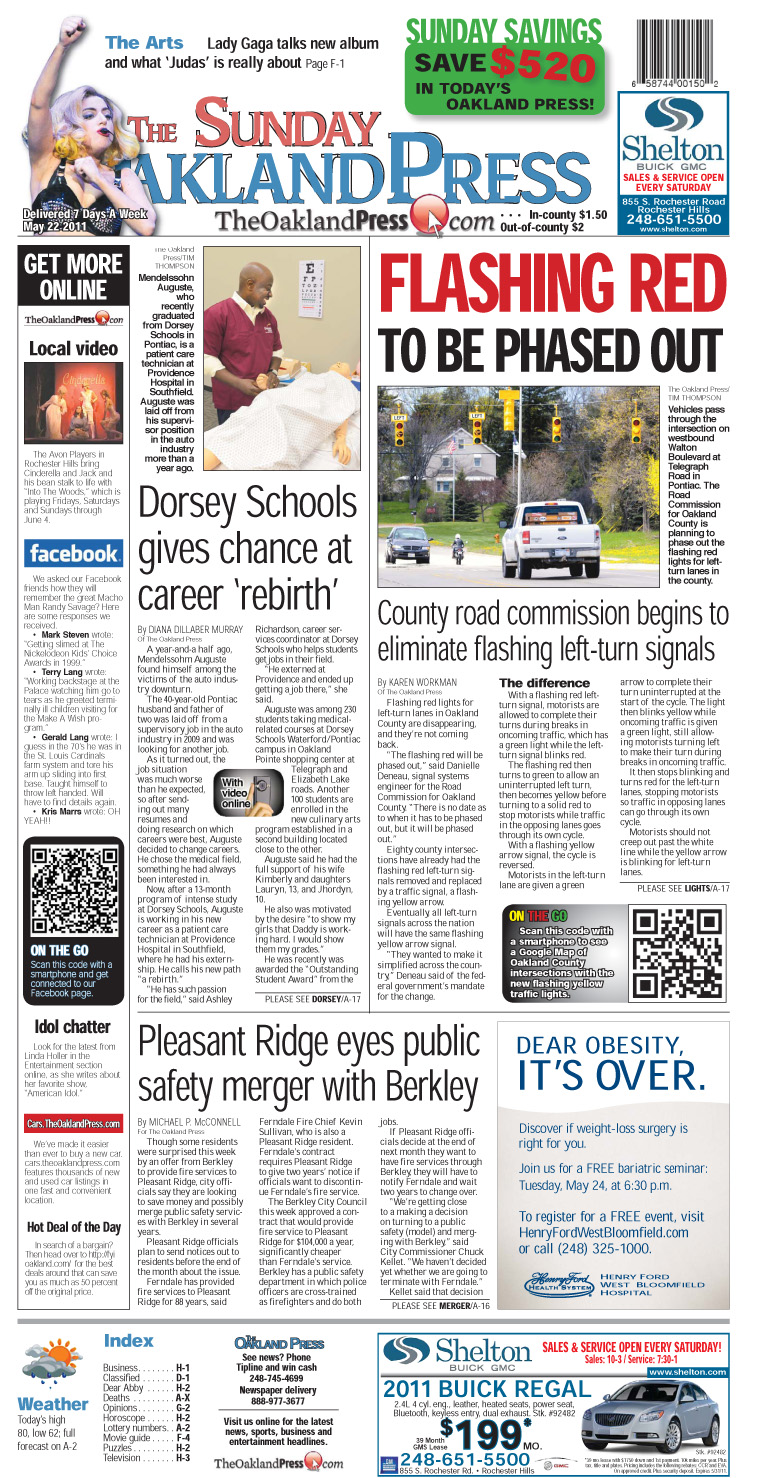
I recently created a Google map for a story I wrote about flashing red traffic signals being phased out not just in our county, but nationwide.

I thought it would be neat to plot on a map all the Oakland County intersections that currently have the new flashing yellow traffic signals as well those slated to be changed over this year.

The Road Commission for Oakland County provided me the list and I built the map based off that. Even though I had more than 80 points to plot, it wasn't terribly time consuming.

Online, the Google map was embedded in my story file. In print, a QR Code linked readers with smartphones to the map.

Once again, the Google maps are proving their worthiness in terms of things readers will use. The traffic signal map code garnered a total of 91 scans. Compare that to my Fires in Pontiac map & QR code, which published twice and got a total of 127 scans. Both numbers are good.

Meanwhile, using QR codes for websites seems to be less of a hit. In a story that published recently about a local couple who travels to Utah to volunteer on their vacations, a QR code linking readers to volunteer information for the organization got only 11 scans. A remembrance page for a local teen who died got just 10 scans. Information about an event, the Great American Basset Waddle, got just 13 scans and a code for a contest on my blog garnered 14.

So you can see the difference. Google Maps = hit. Websites = not so much.

A Google map building tip: When adding your own icons isn't working
When I was creating this map, I wanted the icons to be little traffic signals. I had a good image of one on a flyer from the Road Commission for Oakland County, and since I couldn't find any standard icons I liked, I decided I would try adding the traffic signal image as an icon.
Seems simple enough — double click on the icon box and then select "Add an icon."
It requires you to have a link to the image, so I uploaded it first to my Picasa account (another facet of Google that allows you to store images online). I figured that since both Picasa and My Maps are features of Google, they'd work together. And Picasa does give you a specific link for any image uploaded.
Well, it didn't work.
I ended up in help topics, found my way to reader forums and finally got some good advice: Set up a free account with fileave.com and use the link provided to the image once uploaded there.
The last thing I need is another account and password, but that's OK. In the end, it worked like a charm and got me back to building my map just exactly how I had envisioned it.
Fileave.com seems like a bit of an archaic website — it's super simple — but it worked very well and it's simplicity also meant it was very, very easy to use.

The traffic signals map

View Oakland Co. Intersections with Flashing Yellow Traffic Signals in a larger map

Wednesday, April 27, 2011

QR Code data

We've been increasing our use of QR codes in The Oakland Press' print edition and I've been tracking the data.
The Google Map QR Code

Here are the results:
• We've been running a QR code on our front page rail linking to The Oakland Press' Facebook page for several months, albeit not daily. Over time, that's been used to bring 237 people to our Facebook page.
• Earlier this month, we used a QR code for a contest where readers could enter to win tickets to a Red Wings game. That generated 76 clicks to the page.
• A QR code linking to The Oakland Press sports page has gotten 130 users.
• A Google map plotting the locations of nine fires at vacant homes in Pontiac also got a QR code, which was published twice in print for stories about the fires — 118 people used it.
• Links to the comments page of stories have had less stellar results, though I'd argue that with the right story, they'd be wildly successful. A story about Michigan State Police using a device to extract data from cell phones had a comments page QR code got almost 30 uses; a link to a less controversial story about a drunk driver garnered only 16 uses.

Below is the Google Map that the QR code links to:


View Fires in Pontiac in a larger map

Monday, April 18, 2011

My 30-day project: Bit.ly & QR Codes

With everyone in the newsroom Tweeting, it made perfect sense for The Oakland Press to create a "best uses" of Bit.ly.

My 30-day project gives the why-to and the how-to on using bit.ly to do a lot more than just shorten URLs for Twitter.

By creating a free account, people can track data related to their shortened links. An added bonus? Every link shortened through the use of a bit.ly account also has a QR code generated for it.

QR codes are something we're trying to use more often in our print edition. Why? To be able to interact with a huge and growing segment of news consumers — the mobile market.

Why not just create an mobile app for my newspaper, you ask? As much as I love apps, I'm not sold that they're the be-all end-all for newspapers organizations looking to reach the mobile consumer.

If we were to build an app, should we decide that iPhone users will get an app, or will it be Droid users? Or should we spend the money to make two apps? What about an app for the iPad? And what about apps for all those other tablets coming out now, and the next generation of smartphones lurking just around the bend?

My point is, the app thing is going to change. Right now, your apps are decided by your brand. Conversely, from our standpoint, we'd have to decide which brands are going to get our app. It's not a sustainable model and I have faith that in my lifetime, all smartphones and tablets are going to be able to shop at one master app-store — forget this by-the-brand crap.

I was just telling our Online Editor the same thing. He interrupted me to say, "In your lifetime you think that's going to happen? That's more likely to happen before Obama's term is up."

Red Wings ticket giveaway
Plus, why would you spend all that money creating a bunch of different apps when you could just add a line of code to your website that can tell what devices a user is coming from and automatically optimize the website for whatever that particular device may be?

I believe that's where JRC is headed. It certainly seems like the smartest and best use of resources.

In the meantime, we're finding other ways to connect with the mobile consumer — QR codes being one of them. We're also working on an SMS platform.

Already, we're getting results back from our use of QR codes. Staffer Paul Kampe said a QR code was used to promote a recent Red Wings ticket giveaway and generated a total of 65 clicks, including 35 from the first day and 25 more the next.

"Giveaways seem like a slam dunk for using a QR code," Kampe wrote.

I agree.

Here's video of the presentation broken into 3 approximately 10-minute clips:


This week, I'll be tweaking the Powerpoint included below to shed its OP-specific elements and make it applicable for all JRC properties.
Bitly QR codes